Unifying the Canvas Learning Experience: Leveraging Official Partner Tools for Seamless Instruction
Explore how instructional designers and educators can strategically integrate new official Canvas LMS partner solutions to create a more cohesive and efficient learning environment. This guide will cover how to identify high-impact partner tools, integrate them seamlessly into Canvas courses, and leverage them to unify communication, content delivery, and assessment workflows, ultimately enhancing the overall learner and instructor experience.
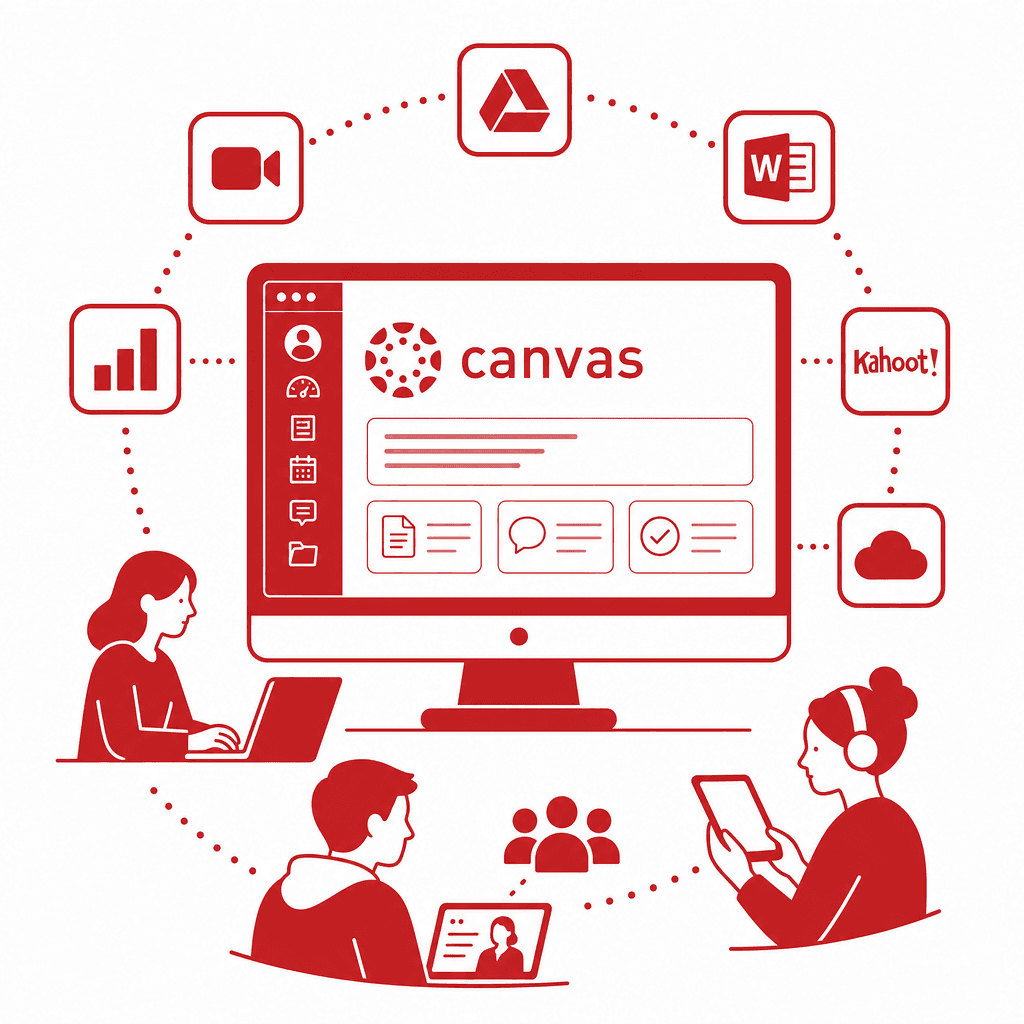
In today's digital education landscape, the integration of official partner tools into Canvas Learning Management System (LMS) has the potential to transform teaching and learning. This article delves into how educators and instructional designers can effectively harness these partner integrations, enhancing the cohesion of course design and improving workflows to create a unified learning environment.
Understanding Canvas LMS and Its Ecosystem
Understanding Canvas LMS and Its Ecosystem: Canvas Learning Management System (LMS) stands as a cornerstone in modern education, providing a flexible, intuitive platform that facilitates engaging learning experiences. With its user-friendly interface, educators can easily navigate course design features, allowing them to create visually appealing and interactive content. This system promotes collaboration and efficient communication among educators and learners, making it an invaluable tool in today’s educational landscape. The ecosystem surrounding Canvas is rich with various EdTech tools, each designed to bring unique functionalities that amplify the platform's capabilities. Partner integrations play a pivotal role in this ecosystem, enhancing the overall teaching and learning process. These integrations allow educators to incorporate tools for assessment, content delivery, and student engagement, all without compromising the seamless user experience that Canvas offers. By tapping into these partner integrations, instructors can unify various aspects of course management, from communication channels to grading workflows. This holistic approach results in a streamlined educational experience that not only supports diverse learning styles but also fosters a more robust and engaging environment for both educators and learners alike.
Identifying High-Impact Partner Tools
Identifying high-impact partner tools that align with educational objectives is crucial for enhancing the Canvas learning experience. When evaluating potential integrations, it is essential to consider user needs, course goals, and pedagogical strategies. Start by engaging with both educators and learners to understand the challenges they face, enabling the selection of tools that address specific pain points. Criteria for selection may include user-friendliness, compatibility with existing course structures, and the ability to foster engagement through interactive features. Furthermore, assess how these tools complement current instructional workflows and enhance collaborative learning opportunities. Among popular partner tools worth considering are: - **Kaltura**: Enhances video content delivery, making lessons more engaging and accessible. - **Flipgrid**: Facilitates asynchronous feedback and peer interaction, creating a collaborative space for discussions. - **Quizlet**: Supports varying assessment methods, helping educators tailor evaluations to diverse learner needs. By focusing on these criteria and selecting tools that demonstrate a clear alignment with educational goals, instructional designers can build a cohesive ecosystem within Canvas, promoting a unified learning experience that benefits both instructors and students.
Seamless Integration into Canvas Courses
Integrating partner tools into Canvas courses requires a strategic approach to ensure that the installation and setup processes are seamless and efficient. Begin with a thorough understanding of each tool's technical requirements, ensuring that your institution has the necessary permissions and compatibility with Canvas. Most partner tools provide detailed documentation and support resources; educators should familiarize themselves with these to overcome any challenges during setup. Prior to integration, it's crucial to prepare course materials that leverage the functionalities of the partner tools. This means not only embedding tools into the course structure but also designing content that encourages interactivity and engagement. For instance, creating assignments that utilize an external assessment tool should align with existing grading rubrics and learning objectives. Maintaining accessibility is equally vital. Ensure that any multimedia content adheres to accessibility standards, so all learners benefit from the integrated tools. Testing the integration in a sandbox environment allows for troubleshooting while also evaluating user experience. Ultimately, proper installation and alignment of course materials with partner tools can enhance instructional workflow and optimize the learning experience for students and instructors alike.
Unifying Communication Within Course Design
In enhancing communication within Canvas courses, partner integrations play a pivotal role by facilitating real-time interactions among students and instructors. Tools such as integrated video conferencing platforms and chat applications create channels for immediate feedback and collaborative discussions, significantly bridging the gap between learners and educators. For instance, integrating tools like Zoom or Microsoft Teams directly within Canvas enables instructors to schedule live sessions, fostering a more interactive and immediate approach to learning. These integrations support features such as breakout rooms and chat functions, which enrich class participation and allow for nuanced discussions that would be harder to achieve solely through asynchronous methods. Moreover, applications like Slack or Piazza can enhance peer-to-peer communication. By embedding these tools within Canvas, educators can create dedicated channels for course discussions, enabling students to ask questions and share resources in real-time. This fosters a sense of community and encourages students to engage actively, leading to improved learning outcomes. Ultimately, these partner integrations streamline information sharing by centralizing communication, thus creating a connected learning environment where feedback flows seamlessly and collaboration is effortlessly facilitated. The intentional use of these tools in course design not only enhances engagement but also supports a more cohesive educational experience for all participants.
Enhancing Content Delivery and Engagement
Enhancing content delivery within the Canvas LMS using partner tools is crucial for fostering an interactive and engaging learning environment. By integrating multimedia components such as video, audio, and simulations, educators can create rich, immersive experiences that captivate learners' attention. Partner tools like Kaltura and Padlet facilitate the seamless embedding of dynamic content, allowing educators to present information in varied formats that cater to diverse learning styles. Moreover, the use of interactive learning modules can shift passive learning into active participation. Tools such as H5P enable instructors to design quizzes, interactive videos, and gamified activities that stimulate student engagement and encourage critical thinking. These elements are essential in promoting motivation, as they make learning both enjoyable and impactful. Personalized learning paths also play a pivotal role in enhancing content delivery. By leveraging adaptive learning tools integrated within Canvas, educators can tailor course materials to meet individual student needs, thereby addressing varied pace and comprehension levels. This customization not only supports differentiated instruction but also empowers students to take ownership of their learning journey. As content becomes more engaging and tailored, student achievement and satisfaction are likely to rise, ensuring a cohesive educational experience aligned with instructional goals.
Streamlining Assessment Workflows
As the educational landscape increasingly emphasizes efficiency and data-driven decision-making, leveraging partner tools to refine assessment workflows within the Canvas LMS becomes crucial. By integrating robust EdTech solutions designed for assessments, educators can automate many of the time-consuming tasks traditionally associated with grading and evaluation. This automation not only saves valuable time for instructors but also ensures a faster turnaround for student feedback, a key component in fostering learning. Partner tools can provide real-time analytics that allow instructors to track student performance more effectively. These tools enable a comprehensive understanding of learning outcomes, revealing trends and areas needing additional attention. Through features such as adaptive assessments, educators can tailor grading criteria to align with individual learning pathways, enhancing both fairness and accuracy in evaluation. Moreover, many assessment integrations allow for a range of question types—from multiple-choice to complex, interactive tasks—facilitating a deeper understanding of student knowledge. By embracing these innovations, instructors can transition from traditional, often rigid assessment methodologies to more fluid and responsive frameworks. This strategic shift not only elevates instructor efficiency but significantly enhances student engagement and mastery of course material.
Conclusions
In conclusion, leveraging official partner tools within the Canvas LMS can significantly improve both the educator and learner experience. By following strategic integration practices, educators can create a seamless and unified learning experience that enhances communication, content delivery, and assessments, ultimately leading to improved educational outcomes.
Understanding Canvas LMS and Its Ecosystem
Understanding Canvas LMS and Its Ecosystem: Canvas Learning Management System (LMS) stands as a cornerstone in modern education, providing a flexible, intuitive platform that facilitates engaging learning experiences. With its user-friendly interface, educators can easily navigate course design features, allowing them to create visually appealing and interactive content. This system promotes collaboration and efficient communication among educators and learners, making it an invaluable tool in today’s educational landscape. The ecosystem surrounding Canvas is rich with various EdTech tools, each designed to bring unique functionalities that amplify the platform's capabilities. Partner integrations play a pivotal role in this ecosystem, enhancing the overall teaching and learning process. These integrations allow educators to incorporate tools for assessment, content delivery, and student engagement, all without compromising the seamless user experience that Canvas offers. By tapping into these partner integrations, instructors can unify various aspects of course management, from communication channels to grading workflows. This holistic approach results in a streamlined educational experience that not only supports diverse learning styles but also fosters a more robust and engaging environment for both educators and learners alike.
Identifying High-Impact Partner Tools
Identifying high-impact partner tools that align with educational objectives is crucial for enhancing the Canvas learning experience. When evaluating potential integrations, it is essential to consider user needs, course goals, and pedagogical strategies. Start by engaging with both educators and learners to understand the challenges they face, enabling the selection of tools that address specific pain points. Criteria for selection may include user-friendliness, compatibility with existing course structures, and the ability to foster engagement through interactive features. Furthermore, assess how these tools complement current instructional workflows and enhance collaborative learning opportunities. Among popular partner tools worth considering are: - **Kaltura**: Enhances video content delivery, making lessons more engaging and accessible. - **Flipgrid**: Facilitates asynchronous feedback and peer interaction, creating a collaborative space for discussions. - **Quizlet**: Supports varying assessment methods, helping educators tailor evaluations to diverse learner needs. By focusing on these criteria and selecting tools that demonstrate a clear alignment with educational goals, instructional designers can build a cohesive ecosystem within Canvas, promoting a unified learning experience that benefits both instructors and students.
Seamless Integration into Canvas Courses
Integrating partner tools into Canvas courses requires a strategic approach to ensure that the installation and setup processes are seamless and efficient. Begin with a thorough understanding of each tool's technical requirements, ensuring that your institution has the necessary permissions and compatibility with Canvas. Most partner tools provide detailed documentation and support resources; educators should familiarize themselves with these to overcome any challenges during setup. Prior to integration, it's crucial to prepare course materials that leverage the functionalities of the partner tools. This means not only embedding tools into the course structure but also designing content that encourages interactivity and engagement. For instance, creating assignments that utilize an external assessment tool should align with existing grading rubrics and learning objectives. Maintaining accessibility is equally vital. Ensure that any multimedia content adheres to accessibility standards, so all learners benefit from the integrated tools. Testing the integration in a sandbox environment allows for troubleshooting while also evaluating user experience. Ultimately, proper installation and alignment of course materials with partner tools can enhance instructional workflow and optimize the learning experience for students and instructors alike.
Unifying Communication Within Course Design
In enhancing communication within Canvas courses, partner integrations play a pivotal role by facilitating real-time interactions among students and instructors. Tools such as integrated video conferencing platforms and chat applications create channels for immediate feedback and collaborative discussions, significantly bridging the gap between learners and educators. For instance, integrating tools like Zoom or Microsoft Teams directly within Canvas enables instructors to schedule live sessions, fostering a more interactive and immediate approach to learning. These integrations support features such as breakout rooms and chat functions, which enrich class participation and allow for nuanced discussions that would be harder to achieve solely through asynchronous methods. Moreover, applications like Slack or Piazza can enhance peer-to-peer communication. By embedding these tools within Canvas, educators can create dedicated channels for course discussions, enabling students to ask questions and share resources in real-time. This fosters a sense of community and encourages students to engage actively, leading to improved learning outcomes. Ultimately, these partner integrations streamline information sharing by centralizing communication, thus creating a connected learning environment where feedback flows seamlessly and collaboration is effortlessly facilitated. The intentional use of these tools in course design not only enhances engagement but also supports a more cohesive educational experience for all participants.
Enhancing Content Delivery and Engagement
Enhancing content delivery within the Canvas LMS using partner tools is crucial for fostering an interactive and engaging learning environment. By integrating multimedia components such as video, audio, and simulations, educators can create rich, immersive experiences that captivate learners' attention. Partner tools like Kaltura and Padlet facilitate the seamless embedding of dynamic content, allowing educators to present information in varied formats that cater to diverse learning styles. Moreover, the use of interactive learning modules can shift passive learning into active participation. Tools such as H5P enable instructors to design quizzes, interactive videos, and gamified activities that stimulate student engagement and encourage critical thinking. These elements are essential in promoting motivation, as they make learning both enjoyable and impactful. Personalized learning paths also play a pivotal role in enhancing content delivery. By leveraging adaptive learning tools integrated within Canvas, educators can tailor course materials to meet individual student needs, thereby addressing varied pace and comprehension levels. This customization not only supports differentiated instruction but also empowers students to take ownership of their learning journey. As content becomes more engaging and tailored, student achievement and satisfaction are likely to rise, ensuring a cohesive educational experience aligned with instructional goals.
Streamlining Assessment Workflows
As the educational landscape increasingly emphasizes efficiency and data-driven decision-making, leveraging partner tools to refine assessment workflows within the Canvas LMS becomes crucial. By integrating robust EdTech solutions designed for assessments, educators can automate many of the time-consuming tasks traditionally associated with grading and evaluation. This automation not only saves valuable time for instructors but also ensures a faster turnaround for student feedback, a key component in fostering learning. Partner tools can provide real-time analytics that allow instructors to track student performance more effectively. These tools enable a comprehensive understanding of learning outcomes, revealing trends and areas needing additional attention. Through features such as adaptive assessments, educators can tailor grading criteria to align with individual learning pathways, enhancing both fairness and accuracy in evaluation. Moreover, many assessment integrations allow for a range of question types—from multiple-choice to complex, interactive tasks—facilitating a deeper understanding of student knowledge. By embracing these innovations, instructors can transition from traditional, often rigid assessment methodologies to more fluid and responsive frameworks. This strategic shift not only elevates instructor efficiency but significantly enhances student engagement and mastery of course material.
Conclusions
In conclusion, leveraging official partner tools within the Canvas LMS can significantly improve both the educator and learner experience. By following strategic integration practices, educators can create a seamless and unified learning experience that enhances communication, content delivery, and assessments, ultimately leading to improved educational outcomes.